Ableton Live 9.5 – Looptasic
Hey guys, and welcome back to Studiowise. This post will be a little different from our usual reviews – more of a first impressions overview than an in-depth feature. I have heard a lot about Ableton Live in passing, but have never had a chance to use the software, so I’m hoping this might be of interest to those like me who are looking to expand their studio toolkit and step outside the box a little in 2016. Ableton generously gave us a copy of their full ‘Suite’ version to play with, so let’s get going and see what all the hype is about.
Ableton Live 9.5 is a DAW (Digital Audio Workstation) that differs from the run-of-the-mill software package you may be used to. Its primary focus is on song arrangement using clips made up of either audio or MIDI data. It is great for quickly creating complicated loops and works well with the optional Push hardware controller. The are lots of similarities with Native Instruments Maschine, though Ableton Live is a complete stand-alone DAW and works perfectly well without the optional hardware.
Another similarity is with Propperhead Reason, in that you can buy the base program and then populate it with DLC ‘packs’ from the online store to create the ideal environment for your personal workflow. Unlike Reason, though, Ableton is fully VST compatible, meaning you have full access to your current collection of instruments and VST effects.
Getting Set
The Ableton Live installation is a breeze and surprisingly fast. If you buy the software online your account will show the core download, plus add-on packs that come with the version you brought (three spec levels are available – Intro, Standard & Suite, though all feature the same core DAW platform, just different levels of add-on’s and track count).
You can add and remove packs as needed so you’re not overwhelmed with bloatware and unnecessary ‘trial demo’ products. I had a slight issue with my Firefox browser not allowing authorization, but once I switched to Chrome, everything clicked into place and quickly let me in.
Being completely new to Ableton I found the included tutorials with sample projects easy to follow and well-paced. Though I might have been able to poke around and work things out eventually on my own, the simple guides presented on the first boot-up really helped.
There is a handy little box on the bottom left that shows mouse over tips on anything you focus on, which is a nice touch. Ableton does an excellent job of introducing the basics to new users of the software. It didn’t take too long for me to work out the basics and be up and running with a simple beat fairly quickly. Like anything, it takes time to gain muscle memory to navigate the UI like a pro, but everything makes sense and was quite simple to use, once you’ve had time to play.
Getting Around

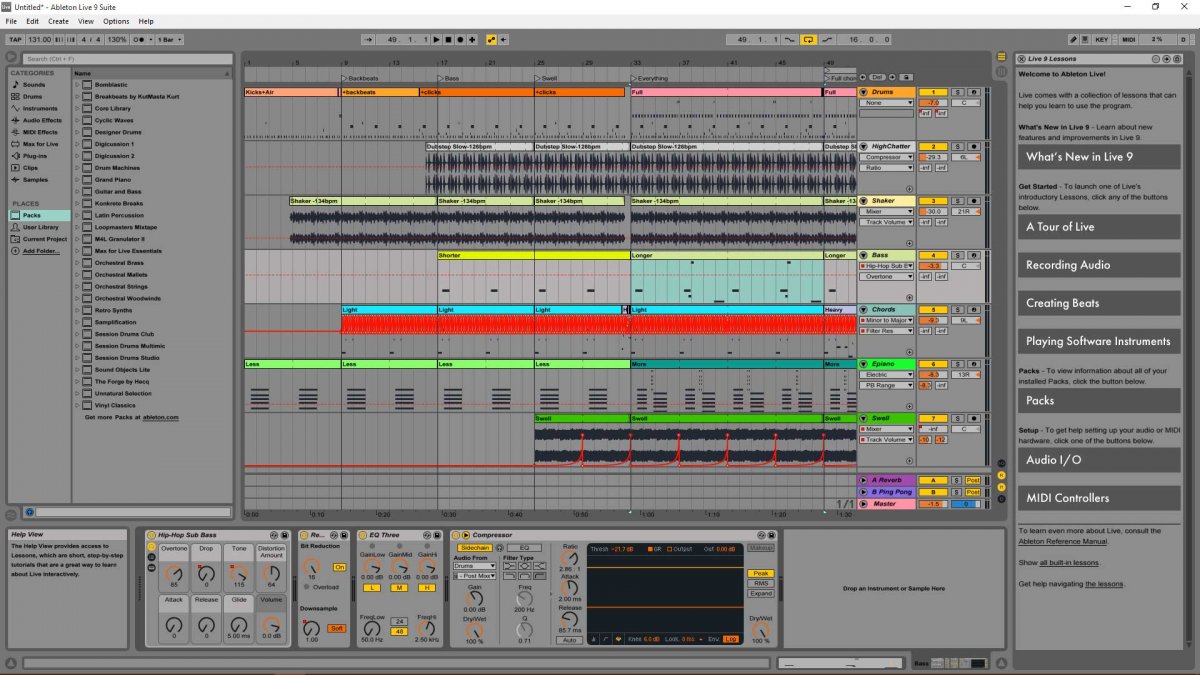
So first impressions right off the cuff – the interface is very clean, almost cartoonish looking at first, but I think it will grow on me. The GUI has a very high contrast style so all the controls pop and should be easy to use on stage or in a dark studio.
Straight away it’s clear to me Ableton is set up as an arrangement tool, not so much a multitrack editor, like ProTools for instance. There is a strong emphasis on plugins and instrument controls – clicking on any data block brings up a wealth of information at the bottom of the screen.
It’s a little weird for me as all the track information (inserted synths and FX) is located on the right-hand side of the screen, with an explorer browser on the left – but since I’m right-handed it does feel very natural that way. It is also very easy to collapse all the side screens and just focus on the entire arrangement.
The handling of third-party VST and instruments is excellent, and for the most part, plugins look and feel like part of the GUI. It’s a little annoying you can’t define more than one location for your VSTs on your hard drive in the preferences, as I like to separate out my plugins from instruments and other sample libraries on my drive.
The GUI is for the most part very intuitive and logical, though a couple of things could be improved upon if I was to get picky – for instance with the record button being right next to the stop button on the transport, and they both look very similar, colouring one red would help.
The browser is an excellent tool, allowing you to simply drag and drop anything you like onto the arrangement lane. Want to load a plugin? Just drag it onto the track, easy. No need for assigning inputs or opening plugin windows etc. And it can be done on the fly, so presuming your PC can handle it, you can drag and drop while you’re performing.
You have searchable categories to choose from that allow you to search for instrument types, effects, clips, etc. You get a quick preview of your choice before committing to load. Each loaded plugin or instrument has a cool hot swap feature so you can load new plugins in place and not lose all your settings.
Even after we loaded up some relatively complex projects I never felt the PC was bogging down. The interface is a joy to work with, particularly on larger projects as you never feel lost or overwhelmed.
Road Test
Ableton Live works by using building blocks to create your songs. You have two primary screens to work on – the arrange, which is similar to most other DAWs in that you see your complete song stretched out on separate tracks. You apply your effects and muck with the arrangement much like any other DAW.
Then there is the session view screen, Ableton’s party trick so to speak. Here you can load up, or create, blocks of music and run them in a quasi-jam mode, sort of like an experimental collection of ideas. Everything is kept in time automatically, all you need to do is stop and start clips and mix in FXs. Perfect for live DJs and EDM performances.
What is particularly refreshing about the two view modes is once you have a decent size project rolling along in arrangement view it is easy to flip over to session mode and drop in some more experimental sounds on the fly to see how they work.
You can play around a little, and if you like the results, use them. If not, just revert back to the full arrangement view. It takes a little bit of time to get this process in your head, but it’s ingenious and leads to creative experimentation, much more than what you would get in a regular DAW.
In general, the entire platform is rock solid. We haven’t experienced any weirdness so far. Even loading up a complete collection of 3rd party VST plugins went without a hitch with everything playing nicely together.
PLUGINS
Most of the included FX plugins are adequate, being useful but not overly exciting. The stock reverb is a standout, for a non-convolution verb, it’s superb, easily matching the quality of the better units we have in the studio. I like the gritty nature of the Grain Delay and Vinyl Distortion effects. Also, the auto filter is excellent for creating fat, analogue-style movement on your tracks. There are better 3rd party effects available, no doubt, but for a stock collection, there’s a lot of scope here and some very creative tools.
The included add-on packs are a little hit-and-miss for me. Mainly not bad, but again nothing that’s going to set your world on fire. I think if you had no other good VSTi instruments in your collection the full Ableton Live 9 suite would be great to get started with, but if you already own a few high-end piano, strings or drum instruments, there’s nothing mind-blowing here.
What is clever though is you can swap and change the elements from each of the packs to your heart’s content. So, for instance, drop a bass sample from one pack into the stock drum machine and play it like a drum pad.
We lined up the Roland synth samples to the real deal hardware keyboard we have here in the Music Nation studio, and they’re pretty good. Sure there are always digital vs. analogue differences, but as a whole they sounded equally ‘analogy’ and fat as the real deal, giving us confidence all the packs have been recorded with care and attention to detail, not just slapped in for extra padding.
The audio-to-MIDI feature is interesting. You can right-click on an audio sample and have Ableton attempt to convert it to MIDI notes for you. We didn’t find the feature particularly accurate unless the audio samples are very simple monotone tracks. However, the sometimes odd results lead me down new roads with my arrangements, so for me using the audio to MIDI too as a creative ‘randomiser’ is pretty nifty.
As a whole, there is a good amount of good instruments and effects here, more than enough to do almost anything required. Ableton 9.5 Suite gives you a good, solid basic collection of practical tools and a simple canvas workspace.
They have a hardware controller available called Push, an MPC/Maschine-style interface that allows you to construct songs on the fly without needing to grab a mouse. We have yet to test out the controller, as there’s none available in NZ right now. But we did manage to have a little play with a unit at the recent Ableton Live launch party hosted by The Rockshop. It’s very intuitive and largely does away with 95% of the mouse clicking on your computer. At $1800 NZD for the bundle, it is a hefty investment but feels very well constructed and looks to work very well. Hopefully more details on this shortly.
Back to Ableton Live, the CPU performance seemed a little weird. Just having a fairly basic 12-track arrangement sitting in idle was chewing up 30% odd of our CPU resources, but in play mode it only jumped up 10 – 15% more, so overall not so bad. We had one instance when it crashed and refused to reboot until we totally cold-booted the PC. It was when we were hot-swapping a VST effect, so we can’t totally point the finger at Ableton for the error. Also, Ableton did completely restore the project from a backup when we did get it started again, so kudos there.
Conclusions
Ableton is wonderfully simple and yet remarkably broad. The interface and toolsets are perfectly balanced to allow intuitive live performance and creative songwriting. What might look to be overwhelming at first soon becomes second nature, and a feeling of using a digital sketchpad versus a software program. The DAW does a fantastic job of getting out of the way and letting you just experiment.
There is no doubt Ableton is focused on electronic music, but music of all genres could indeed be created here. Ableton has a rigid need to keep everything squared away into strict blocks of perfectly timed sequences. Musicians who require looser, less confined flow won’t enjoy this confined workspace.
In general, I found Ableton to be fairly painless to switch to, even from my long-time Reaper background. Everything just kind of makes sense, and help is not far away from anything I was scratching my head over. My whole experience over the last week has been rewarding, and I think there is a lot for me here. Unfortunately, the full Suite version price is relatively steep, though if you already have an adequate collection of VST you may not need to go the whole hog, all versions of Ableton have the same core operating DAW, just different levels of effects and track counts.
If drag-and-drop, sample-based loops, and MIDI sequencing is your thing, Ableton Live 9.5 is easily your dream production tool. If you’re totally new to digital audio Ableton is a solid choice for starting out with and I can see why it is so popular with remix producers and electronica musicians.
Get the 30-day trial now and give it a while, let us know what you think
Test Machine Specs
Core i7 920 12gig RAM. Library installed on secondary 7200 drive.
Windows8, 64bit.
Tascam DM4800 interface (ASIO drivers).
Yamaha MOTIF and Akai MPD218 controllers.
Alesis M1 Active Mk2
Aventone Mixcubes
Shure SRH940 monitors